1. Introduction of SPS Hole (Optional)
Note
This page is automatically translated from Japanese to English. Please refer to the original Japanese page for the most accurate information.
Please introduce SPS Hole to your avatar beforehand, using resources such as Free [MA compatible] Simple Setup SPS Hole.
Regarding SPS Plug, introducing it beforehand is fine, but the model on/off function of VRCPleasure will become unavailable.
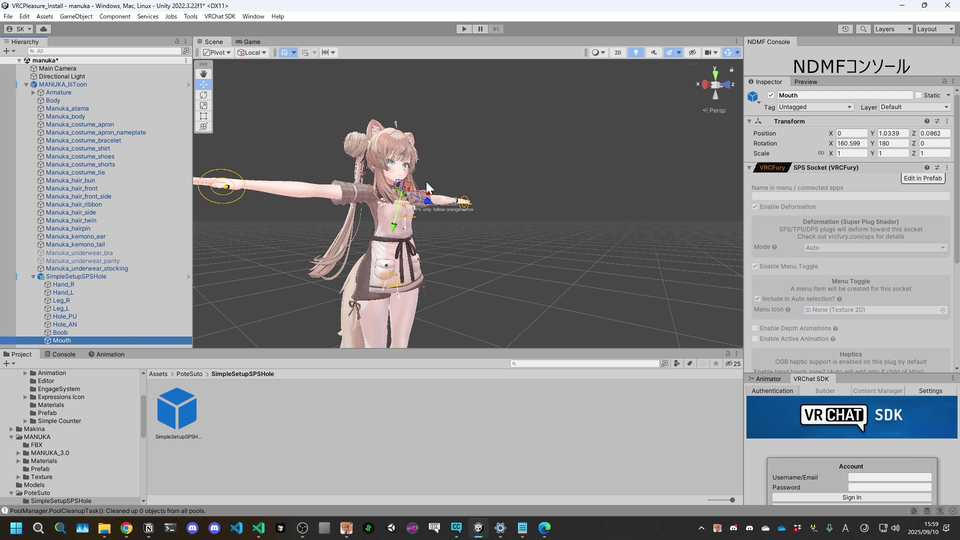
You just need to place the prefab and adjust the position of each component.
Important
In a later step, by pressing Execute settings for SPSPlug/Socket within the Auto-Setup, you will be able to use SPS Plug/Sockets with VRCPleasure.
If you add it after running Auto-Setup, you will need to press Execute settings for SPSPlug/Socket again and perform SPS Haptics Setup.
Please also refer to 4. Changing SPS Model and Settings and 5. SPS Haptics Setup (SPS is required).